
Whether you operate a neighborhood boutique, a bustling café, or a growing retail chain, the checkout experience has a direct impact on customer satisfaction. Fast transactions, secure payments, and accurate inventory tracking all contribute to smoother operations and stronger profits. While many business owners concentrate on selecting software, the hardware employees use every day is just as important.
Today’s point-of-sale (POS) systems have evolved far beyond the traditional cash register. They now serve as the central hub for managing sales, inventory, customer information, employee performance, and business insights. Choosing the right solution requires more than comparing prices—it means finding technology that supports your unique business model and future ambitions.
Why Modern POS Systems Matter
Imagine two clothing stores located on the same street. One relies on an aging cash register that simply records sales and stores cash. The other uses a modern POS system that instantly updates inventory, tracks customer purchases, accepts contactless payments, and generates real-time sales reports.
At the end of the day, the second business has a clear picture of its best-selling products, inventory shortages, staff performance, and daily revenue. The first business still faces hours of manual reconciliation.
This difference highlights why modern POS systems have become an essential investment for businesses of every size.
Understanding Today’s POS Technology
A point-of-sale system combines hardware and software to complete transactions while managing many other operational tasks. Besides accepting payments, these systems often help businesses monitor inventory, create customer profiles, manage employee schedules, generate financial reports, and integrate with accounting software.
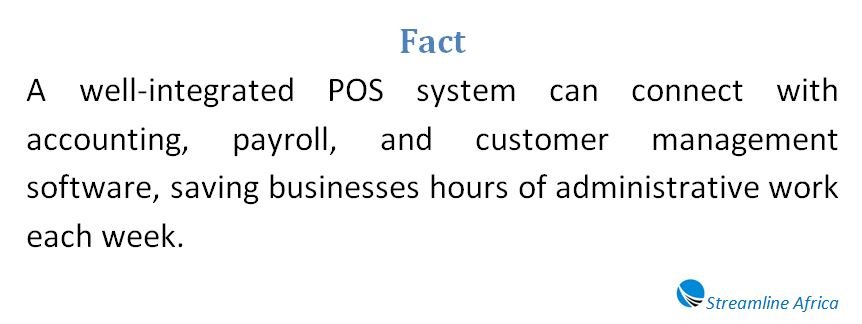
Rather than functioning as a standalone machine, today’s POS solutions connect multiple parts of a business into one centralized platform. This integration reduces manual work and allows managers to make better-informed decisions.
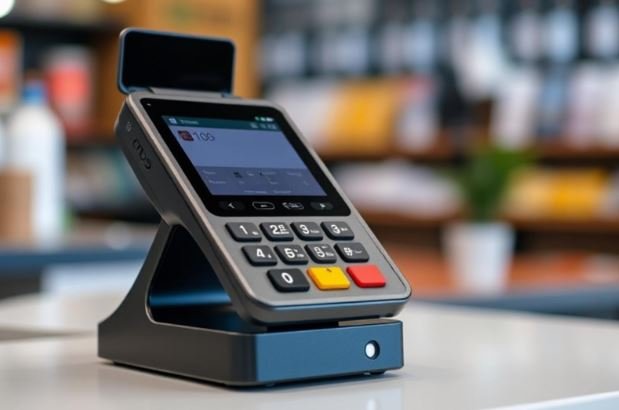
Stationary Checkout Systems
Many businesses continue to benefit from fixed POS stations installed at designated checkout counters.
These systems are common in supermarkets, pharmacies, department stores, bookstores, and restaurants where customers naturally complete purchases at a central location.
A typical fixed setup may include:
- A touchscreen terminal
- Barcode scanner
- Receipt printer
- Cash drawer
- Card payment terminal
- Customer-facing display
Because everything remains permanently installed, these systems are ideal for businesses with steady customer traffic and predictable checkout locations.
Retailers processing hundreds of transactions every day often appreciate the speed and reliability that fixed workstations provide.
Mobile POS Solutions
Business is no longer limited to a checkout counter.
Mobile POS systems allow staff to complete sales using tablets, smartphones, or handheld devices connected to portable card readers.
These flexible solutions have become popular among:
- Food trucks
- Pop-up shops
- Market vendors
- Event exhibitors
- Home service providers
- Restaurants offering tableside payment
For example, a florist attending a weekend wedding exhibition can accept payments instantly without carrying bulky equipment. Likewise, restaurant servers can process bills directly at customers’ tables, reducing waiting time and improving service.
Mobile systems also support contactless payment methods, digital wallets, QR code payments, and chip-enabled cards.
Matching the POS System to Your Business
Not every company requires the same technology.
A neighborhood bakery has different operational needs than a multi-location electronics retailer.
Before purchasing any equipment, consider how customers interact with your business.
Questions worth asking include:
- Where do customers normally pay?
- How many checkout stations are needed?
- Will employees move around while serving customers?
- Do you attend off-site events?
- Is cash still a major payment method?
Your answers will help determine whether a fixed, mobile, or hybrid solution makes the most sense.
Selecting the Right Hardware
The hardware should support daily operations without slowing employees down.
A restaurant may need waterproof touchscreens that withstand spills, while a clothing retailer may prioritize fast barcode scanners and customer displays.
Businesses should also think about durability. Equipment used continuously throughout the day should withstand heavy usage without frequent breakdowns.
Depending on your operations, your hardware package may include:
- Touchscreen terminals
- Receipt printers
- Barcode scanners
- Cash drawers
- Portable payment readers
- Kitchen display screens
- Label printers
- Customer displays
Choosing equipment designed specifically for your industry often improves productivity.
Prioritizing Software Features
While attractive hardware catches attention, software ultimately determines how much value a POS system delivers.
Different businesses benefit from different features.
Retail stores may depend heavily on inventory tracking and purchase order management.
Restaurants often require table management, kitchen communication, and menu customization.
Service businesses may place greater importance on appointment scheduling and customer relationship management.
Other valuable features include:
- Sales reporting
- Employee permissions
- Loyalty programs
- Gift card management
- Multi-location management
- Customer purchase history
- Marketing integrations
- Automated tax calculations
Instead of paying for dozens of features you may never use, focus on the capabilities that solve your current business challenges.
Creating a Realistic Budget
Cost is about more than the initial purchase price.
Business owners should evaluate both upfront and ongoing expenses.
These can include:
- Hardware purchases
- Monthly software subscriptions
- Payment processing fees
- Technical support
- Maintenance
- Equipment replacement
Sometimes a system with a slightly higher monthly fee can save significantly more money through improved efficiency and reduced administrative work.
Looking at total ownership costs over several years provides a more accurate financial picture than comparing purchase prices alone.
Cloud-Based or Local Installation?
Many businesses now choose cloud-based POS platforms because they provide flexibility and remote access.
Managers can review sales, monitor inventory, and generate reports from virtually anywhere with internet access.
Cloud systems also simplify software updates and backups.
However, some organizations still prefer locally installed systems that store information on-site.
These businesses often prioritize greater control over their infrastructure or operate in environments where internet connectivity is unreliable.
Neither option is universally better—the best choice depends on operational needs and technical preferences.
Ensuring Compatibility
Technology works best when different systems communicate seamlessly.
Before making a purchase, confirm that the POS solution integrates with existing business tools.
Common integrations include:
- Accounting software
- Payroll platforms
- Inventory management systems
- Customer relationship management software
- Email marketing platforms
- E-commerce websites
Businesses planning future expansion should also verify that additional terminals and locations can be added without replacing the entire system.
Test Before You Commit
A demonstration often reveals details that marketing brochures cannot.
Employees should feel comfortable navigating the interface after minimal training.
Simple workflows reduce errors during busy periods and shorten onboarding time for new staff.
Whenever possible, request a live demonstration or trial period before signing a long-term contract.
Testing also allows businesses to evaluate equipment speed, screen responsiveness, receipt printing, and payment processing under realistic conditions.
Don’t Overlook Customer Support
Technology occasionally fails, regardless of how advanced it may be.
When checkout systems stop working, sales often stop as well.
Reliable customer support can make the difference between a brief inconvenience and an entire day’s lost revenue.
Look for providers offering:
- Extended support hours
- Multiple contact options
- Online knowledge bases
- Software updates
- Hardware replacement services
A vendor with strong customer service becomes a valuable long-term partner rather than simply a software supplier.
Payment Flexibility Matters
Consumers increasingly expect businesses to accept their preferred payment methods.
A modern POS system should comfortably handle:
- Credit cards
- Debit cards
- Contactless payments
- Mobile wallets
- QR code payments
- Gift cards
- Cash
Offering multiple payment options improves customer convenience and reduces abandoned purchases.
Businesses should also compare payment processing rates carefully, as even small percentage differences can significantly affect profitability over time.
Protecting Customer Information
Security should never become an afterthought.
Payment information represents one of the most valuable types of customer data, making it an attractive target for cybercriminals.
Choose systems that include:
- End-to-end encryption
- Secure payment processing
- User access controls
- Automatic software updates
- Compliance with recognized payment security standards
Strong security not only protects customers but also safeguards the reputation of your business.
Benefits Beyond Faster Checkout
The greatest value of a POS system often extends far beyond processing payments.
Modern solutions provide insights that help owners make smarter decisions.
Business intelligence features can reveal:
- Best-selling products
- Slow-moving inventory
- Peak shopping hours
- Employee productivity
- Customer purchasing trends
- Seasonal demand patterns
Armed with this information, managers can optimize staffing, improve inventory purchasing, and identify new sales opportunities.
Rather than relying on guesswork, decisions become driven by real operational data.
Making the Final Decision
There is no universal POS solution that fits every business.
The ideal system balances affordability, reliability, functionality, and scalability while supporting your specific operational needs.
Instead of choosing the platform with the longest list of features, select one that simplifies everyday work, improves customer service, and can grow alongside your business.
A carefully selected POS system is more than a payment tool—it becomes the operational foundation that helps businesses serve customers more efficiently, manage resources intelligently, and position themselves for long-term success in an increasingly digital marketplace.
Frequently Asked Questions
How Is a POS System Different From a Traditional Cash Register?
Unlike traditional cash registers that only record sales and store cash, modern POS systems provide inventory management, sales reporting, payment processing, and business analytics in real time.
What Is the Difference Between Fixed and Mobile POS Systems?
Fixed POS systems stay at a checkout counter and are ideal for high-volume stores, while mobile POS systems use tablets or smartphones, making them perfect for restaurants, pop-up shops, and businesses on the move.
How Do I Know Which POS System Is Right for My Business?
Start by evaluating how your business operates, where customers make payments, the number of checkout points you need, and whether mobility or a fixed setup better suits your workflow.
Which Hardware Should I Look for in a POS System?
Depending on your business, you may need touchscreen terminals, barcode scanners, receipt printers, cash drawers, customer displays, or portable card readers that improve speed and efficiency.
What Software Features Should Be a Priority?
Focus on features your business will actually use, such as inventory tracking, employee management, customer loyalty programs, appointment scheduling, and sales reporting.
Should I Choose a Cloud-Based or On-Premise POS System?
Cloud-based systems offer remote access, automatic updates, and flexibility, while on-premise systems provide greater control over data and may suit businesses with limited internet access.
Why Is Integration Important When Choosing a POS System?
A POS system that integrates with accounting, payroll, inventory, and e-commerce platforms reduces manual work and keeps business information synchronized.
How Can a POS System Improve Business Performance?
Beyond processing payments, a POS system provides valuable insights into customer behavior, inventory levels, employee productivity, and sales trends, helping owners make smarter decisions.
What Should I Consider Before Making the Final Purchase?
Compare pricing, customer support, scalability, payment processing fees, security features, and ease of use. A POS system should not only meet your current needs but also support future business growth.